What Is a 1099 Form For Independent Contractors? – A Complete Guide

Struggling to file the tax as Independent contractors? One key to file the tax easily is- to know about 1099 form for independent contractors. 1099-NEC form plays vital role in reporting payment made to independent contractors. Before filling the form you need to understand about the form. 

Actually, small businesses and contractors may find tax preparation to be a confusing task, particularly if they are unfamiliar with financial documentation. 

If you’re self-employed, independent contractor, chances are you’ll come across the 1099-NEC form, which reports payments made to independent contractors. There are several types of 1099 forms, and knowing which version of the form applies to your circumstances is essential to maintaining compliance and avoiding fines. Each version of the form has a distinct function. However, the 1099 form isn’t as difficult as it first appears once you break it down.

In this guide, we’ll cover everything you need to know about the Independent Contractor Pay Stub and form! Stay tun000ed. 

Create Your First Free Paystub

Generate accurate paystubs instantly with our free payroll check generator.

Get Started Now →

What is the 1099-NEC Form?

“The 1099-NEC form – Non- Employee Compensation form is an official  tax document used to report payments made to independent contractors, and other non employees.” 

If a business pays you $600 or more in a tax year, they are required to issue this form to both you and the IRS tax form by January 31 of the following year.

Consider 1099 independent contractor form a receipt that details the precise amount of money you made from a specific client or business over the course of the year. When you file your taxes, you will then use this form to report your income from self-employment. Independent contractors do not have taxes deducted from their Independent contractor pay stub, in contrast to regular employees who receive a W-2

The IRS can verify that both parties are reporting the same information with the use of this 1099 Form for Independent Contractors. A clear and transparent record of non-employee compensation is created when businesses submit the form to the IRS and contractors include the same income on their tax return.

To put it briefly, anyone working independently who complies with IRS regulations should use the 1099-NEC tax form.

Stay Compliant with Automated Paystubs

Use our payroll check generator to calculate net pay, deductions, and taxes with ease.
Save time and file taxes with confidence.

Generate My Paystub

Why a 1099 Form for Independent Contractors Is Needed? 
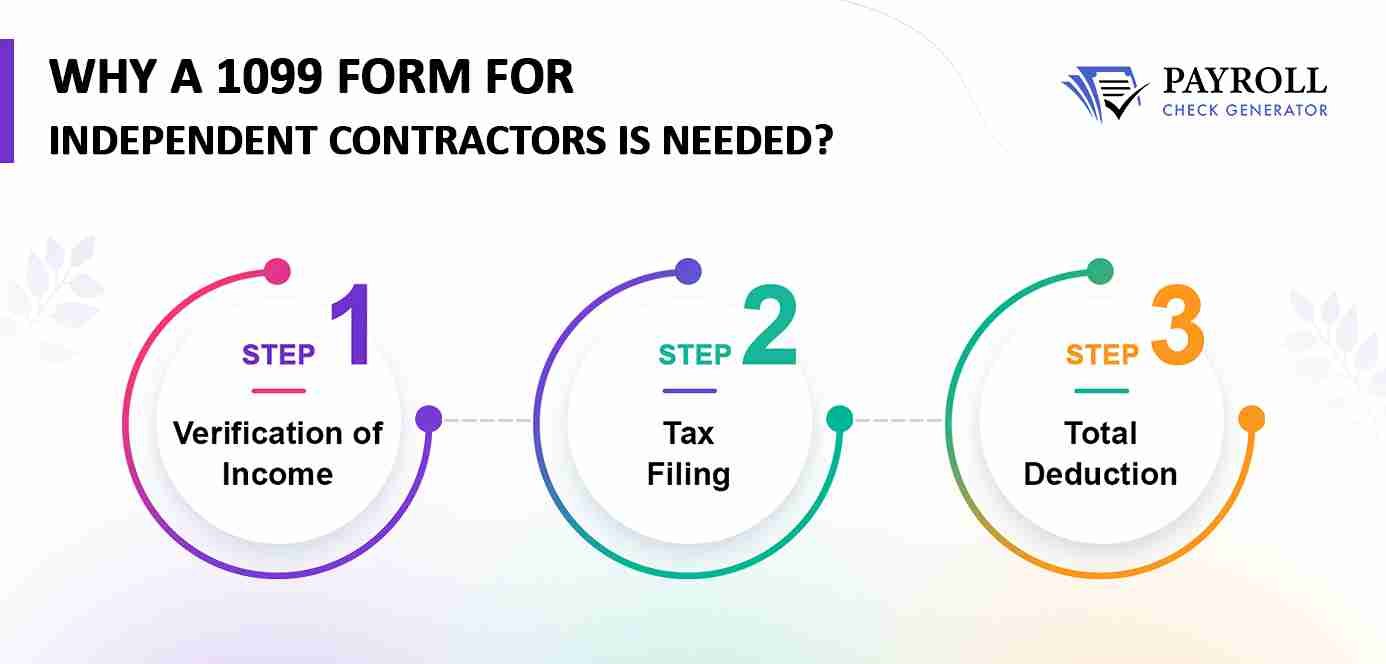
Why a 1099 Form for Independent Contractors Is Needed

More than just a piece of paper, the 1099 Form for Independent Contractors is an essential tool for independent contractor tax management.

This is why it’s important:

  • Verification of Income: The IRS tracks your income from clients or businesses using the 1099-NEC. It keeps your tax returns accurate and compliant by ensuring that the income you report corresponds with what the payer has reported.
  • Tax Filing: You must pay both income taxes and self-employment taxes as an independent contractor or freelancer. A clear record of your earnings is provided by the 1099-NEC, which helps you determine how much you owe and prevent unpleasant surprises when it comes time to file your taxes.
  • Deductions: Another place to start when claiming tax deductions is with the 1099-NEC. To lower their taxable income and save money, independent contractors can deduct allowable business expenses like office supplies, software subscriptions, travel, and other costs associated with their job.

Both contractors and small businesses can handle tax season with confidence if they are aware of their obligations and submit the required paperwork on time with right forms.

Key Details Mentioned On The 1099-NEC Form

Key Details Mentioned On The 1099-NEC Form

By knowing your responsibilities and filing the necessary independent contractor forms on time, both businesses and contractors can navigate tax season with confidence. Businesses and independent contractors alike must accurately report income to the IRS using the 1099 Form for Independent Contractors, which includes crucial information. 

Below is a summary of the important information:

Payer Information

The company or customer that made the payments is listed in this section. It contains the Taxpayer Identification Number (TIN), name, and address of the payer.

Recipient Information

This contains the name, address, and Employer Identification Number (EIN) or Social Security Number (SSN) of the independent contractor.

Payment Information

On your tax return, you will list this amount as income.

  • Box 1- The total amount paid to the contractor for services rendered during the tax year is displayed in Box 1-Nonemployee Compensation. 
  • Box 2- Direct Sales for Resale: Verified whether the payer sold consumer goods directly to the contractor for resale for at least $5,000.
  • Box4- If applicable, any federal tax withheld under backup withholding rules is shown in Box 4-Federal Income Tax Withheld.

State Data

Boxes 5–7: Provide the contractor’s taxable state income, the payer’s state tax number, and any state income tax withheld.

How To Use the 1099-NEC Form For Tax Filing? 

By knowing your responsibilities and filing the necessary forms on time, both businesses and contractors can navigate tax season with confidence.

It’s time to use your 1099-NEC to properly file your taxes after you receive it. This is a detailed guide for freelancers and independent contractors:

  • Report Income on Schedule C

The total income listed on your 1099-NEC should be reported using Schedule C (Profit or Loss from Business). A crucial component of your tax return, this form records your self-employment income.

  • Determine Self-Employment Tax on Schedule SE

Self-employment taxes, which include Social Security and Medicare, are due as an independent contractor. Based on your net income, Schedule SE assists you in calculating these taxes.

  •  Claim Business Deductions

The independent contractors can deduct eligible business expenses to lower taxable income. Keep records of costs such as office supplies, software, travel, and business meals, as these can significantly reduce your tax liability.

  • Pay Quarterly Estimated Taxes (if applicable)

If you expect to owe more than $1,000 in taxes, you should make quarterly estimated tax payments using Form 1040-ES. These payments help cover both income and self-employment taxes and prevent penalties at year-end.

By following these steps, you can use your 1099-NEC effectively, report your income accurately, and stay compliant with IRS rules, making tax season much more manageable.

How Payroll Check Generator Can Help You? 

It can be difficult to manage income as a freelancer or independent contractor, but a paystub generator like Payroll Check Generator makes it easy. You can simplify tax filing, keep accurate records, and make sure your earnings are consistently reported accurately with a trustworthy tool.

A free payroll check generator can be useful in the following ways:

  • Simplify Tax Filing: When filling out your 1099-NEC or submitting your self-employment taxes, use your pay stubs as evidence of income. It is quicker and simpler to prepare taxes when records are clear.
  • Monitor Your Earnings: Create thorough pay stubs to determine the precise amount you have received from each customer. This keeps you prepared for tax season and organized.
  • Verify Correct Payments: Verify again that you are getting paid correctly by your clients. Discrepancies can be identified early because a pay stub offers a clear breakdown of payments.
  • Quick & Simple to Use: Without the need for complex software or accounting knowledge, generate expert, accurate pay stubs in a matter of minutes.

Independent contractors can keep accurate financial records, lessen tax anxiety, and confidently concentrate on expanding their businesses by utilizing a payroll check generator.

Final Thought

For independent contractors, and companies that deal with non-employees, the 1099 Form for Independent Contractors is an essential tool. Using or issuing this form correctly guarantees that income is reported to the IRS accurately, helps prevent penalties, and facilitates a much easier tax season.

The 1099-NEC gives contractors a transparent record of their earnings, which is essential for self-employment tax calculations, income calculations, and deduction claims. You can handle income with confidence and maintain complete compliance with IRS regulations by being aware of the 1099-NEC and using resources such as a independent contractor 1099 pay stub template. 

Simplify Your Tax Filing Today

Generate professional paystubs instantly and keep your tax filings accurate,
organized, and IRS compliant — all in just a few clicks.

Generate Paystub Instantly

FAQs: 

What is a 1099 form in the US?

In the US, income received from sources other than regular employment, such as contract or freelance work, is reported using a 1099 form. It assists the IRS in tracking taxable income that isn’t shown on a W-2.

What is the tax term 1099?

IRS forms that report various forms of income, such as dividends, interest, and nonemployee pay, are referred to by the tax term “1099.” It guarantees the accounting of all taxable income.

What is 1099 in US staffing?

A 1099 indicates that a worker is an independent contractor rather than an employee in US staffing. They don’t get employee benefits and pay their own taxes.

Does a foreign company need to issue a 1099 to a US contractor?

Yes, if a foreign business pays a US contractor $600 or more in a year, it has to file a 1099-NEC. This guarantees accurate IRS reporting.

What is a 1099 in the USA?

In the United States, non-salary income is reported on a tax form called a 1099. It guarantees that independent contractors, freelancers, and others pay the appropriate amount of self-employment and income taxes.


1099 Employee: Complete Guide for Employers and Contractors

When it comes to workforce management, you might hear the term 1099 employee quite a few times. Businesses might use this term very casually but speaking frankly, this term is used to define 1099 independent contractors.

Learning about 1099 employees means it is crucial for both employers and contractors. Misclassification will lead to hefty IRS penalties, tax issues and lawsuits. This complete guide focuses on 1099 employees.

Generate Paystubs for 1099 Employees Instantly

Save time and avoid IRS penalties by creating accurate paystubs for 1099 independent contractors. Try our trusted Free Paycheck Creator today.

Create Your Free Paystub Now

What is a 1099 employee?

A 1099 employee is someone who provides service to businesses but is not considered as a full-time employee. Unlike a W-2 employee, a 1099 contractor is a self-employed individual who handles taxes, benefits and working schedule on their own.

Being an independent contractor, they are not considered as the company’s employees in a typical way. They are their own bosses when it comes to taxes, benefits, and the working hours. You can generate pay stubs for independent contractors without any hassle through our website.

The 1099 workers’ employers gain lower costs and flexibility as they can choose to hire them. In contrast, 1099 for an employee gets the option to not only work as they want but have a few sources of income.

Form 1099 vs W2

Features 1099 Employee W-2 Employee
Employment Self-employed Employed by the business
Tax withholding Responsible for their own taxes Employer withholds taxes
Benefits No benefits Eligible for benefits
Work schedule Sets their own schedule Employers set schedule

Highlighting the advantages of hiring a 1099 independent contractor

Employers choose to work with a 1099 independent contractor for various reasons:

  • Reduced payroll costs: No need to pay payroll taxes and unemployment insurance.
  • Access to expertise: Many 1099 employees bring in specialized skills without giving full-time commitments.
  • Scalability: 1099 independent contractors can be hired for short-term projects.
  • Flexibility: Businesses can adjust their workforce based on demand.

You can easily generate 1099 pay stubs using the free pay stub generator.

Why Businesses Trust Free Paycheck Creator

Our paystub generator free tool helps contractors and businesses simplify payroll with instant PDF downloads, automated calculations, and error-free stubs.

Generate 1099 Paystubs Now


Types of 1099 forms for independent contractors


Types of 1099 forms for independent contractors


The following are the different types of
Form 1099 for contractors for independent contractors:


1099 A: When your mortgage lender voids part of your mortgage, a 1099 A form is sent to you since, as per the IRS, getting rid of the debt is considered income. The revenue is subject to tax, and you have to declare it in your tax return.
1099 B: If you made an income from some sort of bartering via bartering exchange or from a sale of securities, you receive 1099 B for the money you have received.
1099 C: If you have persuaded a credit card issuer to forgive your debt for less than you owe, it comes under 1099 C and needs to be reported in your tax return.
1099 CAP: If you are a shareholder in any corporation that had a capital structure change and you received money, stock, or other assets as a result, you may receive a 1099 CAP.
1099 DIV: This is the most common form of 1099. You receive a 1099 DIV when you earn dividends. However, money earned on your share account at the credit union comes under a different 1099 — 1099 INT.
1099 INT: Earning interest of more than USD 10 from a bank or any other financial institution will get you a Form 1099 INT.
1099 NST: 1099-NEC form is used in the U.S. to report payments of $600 or more made to independent contractors, freelancers, or self-employed individuals during the tax year.

How to pay 1099 employees?

A 1099 employee is not paid the same as a traditional employee. Below is how employers can manage payments:

  • Agree on a payment structure: Set whether the payment will be made hourly or per project.
  • Use invoices: 1099 form independent contractor are paid based on invoices submitted for finished work. The invoice should include the payment amount, services rendered and the payment terms.
  • Mode of payment: Payment can be made via various methods such as bank transfer or paypal. 
  •  Issue form 1099-NEC: If you pay a contractor $600 during the tax year, you must file a 1099-NEC with the IRS and provide a copy to the contractor by 31st January of the following year.

You can create Pay Stubs for Independent Contractors by using the free paycheck stub maker.

Best Tips for Working with a 1099 employee

  • Define job expectations and deliverables in a contract.
  • Make sure the payment terms are agreed upon before the work begins.
  • Keep proper records of payments and issue a 1099-NEC form.
  • Consult a tax professional when you aren’t sure about tax obligations.

Need accurate pay records for your 1099 employees? Save time and avoid errors with a reliable Check Stub Generator

FAQs

1- What is 1099 in US staffing?

The 1099 employee definition refers to independent contractors – they are professionals who work for a particular organization for a temporary time period. They are casually referred as 1099 employees, based on the IRS 1099-MISC form which independent contractors have to fill up and declare their earnings.

2- Who can work on 1099 in the US?

A 1099 employee is a contractor rather than a full-time employee. These employees may also be referred to as freelancers, self-employed workers, or independent contractors.

3- Is 1099 only for US citizens?

That’s because Form 1099-NEC only applies to what the IRS calls U.S. persons, which means Americans and green card holders working abroad. If your contractor doesn’t fall into one of these categories, and they provide services entirely outside of the U.S., Form 1099 isn’t required.

4- Is free tax USA free for 1099?

FreeTaxUSA handled it like a pro – and for free! If you use a 1099-MISC this is probably the best program that doesn’t charge extra for it. I’ve used it for 3 returns now without any issues. It’s fast and easy.

5-  What is the minimum amount for 1099?

The OBBBA also changes the reporting threshold for Form 1099-MISC and Form 1099-NEC. Currently $600, the threshold will increase to $2,000 for tax year 2026. For 2027 and subsequent years, the threshold for both forms will be adjusted for inflation.

Ready to Create Your First 1099 Paystub?

Whether you’re a freelancer, contractor, or business owner, Free Paycheck Creator makes it easy to generate professional paystubs online in minutes.

Create Free Paystubs Today


Key Takeaways

One who works as a 1099 employee or is an independent contractor provides companies with the possibility of saving money and the option to have more control over the work while workers get more freedom. But, it is very important for both parties to be aware of their tax obligations and classification guidelines in order to prevent fines from the IRS.

Whether you are an independent contractor who is seeking clients or a company that is going to hire freelancers, my advice is to always keep proper records and seek professional tax help.

Payroll Check Generator: How Businesses Can Create Accurate Payroll Stubs

Generate Professional Pay Stubs Instantly!

Simplify payroll management with our easy-to-use Payroll Check Generator. Accurate, secure, and ready in minutes.

Create Your Pay Stub Now

Every business, big or small, depends on payroll as a key player for them. Employees always rely on accurate payroll check stubs for understanding their wages, taxes, and deductions. Employers who provide these records ensure that compliance with labor laws is in check and trust is maintained within the workplace environment.

This blog focuses on how businesses can use a payroll check generator effectively, why it matters, and the benefits it brings to both employers and employees.

What is a Payroll Check Generator?

A payroll check generator is a tool that allows companies to create payroll stubs accurately for their employees. This excellent tool helps you automate all your wages, deductions, tax withholdings, and net pay, which shows all the details in a professional format.

The vast majority of businesses employ a payroll check generator, to keep up with their small business payroll requirements. Freelancers and small business owners can use the free tool to save money and still have professional payroll records.

Why Accurate Payroll Stubs Matter?

Payroll check stubs are more than just documents. They serve multiple purposes:

  • Legal Compliance: Employers who are legally required in most jurisdictions to provide pay stubs showing a detailed wages and deductions breakdown.
  • Transparency: Employees can see exactly how their gross pay is turned into net pay, reducing disputes.
  • Record Keeping: Payroll check stubs serve as proof of income for loan applications or filing taxes.
  • Employee Trust: When employees see consistent and professional pay check stubs as they gain confidence in their employer.

Accurate and professional pay stubs help businesses to avoid compliance issues and strengthen employer and employee relationships.

Key Features of a Reliable Payroll Stub Generator

Feature Description
Automated calculations The generator automatically calculates gross pay, deductions, taxes, and net pay. This eliminates manual errors and ensures employees receive accurate payroll check stubs.
Customization This tool allows you to add logos, choose layouts, and include unique deduction categories, making the payroll stubs look professional and branded.
Secure data handling Payroll data is sensitive. A reliable payroll check generator uses encryption and secure storage to protect employee information.
Scalability The payroll check generator should easily handle employees without requiring any system overhaul.
Download in PDF When a paystub is generated, you can easily download it in PDF format.

Stop Struggling with Payroll!

Automate payroll calculations, deductions, and taxes in seconds. Perfect for small businesses, freelancers, and startups.

Try Payroll Generator Free

How Can Businesses Create Accurate Payroll Stubs?

Generating accurate payroll stubs is vital for both compliance and employee satisfaction. All thanks to the payroll check generator, which makes the process much easier. Below is a step-by-step guide:

  • Collect employee information: Gather information like full name and address, social security number, and employment type.
  • Record work hours: For hourly workers, insert the number of hours worked. In case of a salaried employee, insert the fixed salary amount.
  • Apply deductions and taxes: Subtract deductions such as federal, state, and local taxes, health insurance premiums, and retirement contributions.
  • Verify net pay: Net pay is the actual amount that an employee takes home after all the deductions have been made. Mistakes here can lead to compliance issues.
  • Generate pay stubs: Create pay stubs using payroll stub generator free and download them easily in PDF format.

Take the stress out of payroll management with our easy-to-use Payroll Check Generator. Create accurate, professional payroll check stubs in minutes.

Benefits of Using a Payroll Check Generator For Businesses

Benefit Description
Automation Manually completing the payroll for several hours is a common occurrence, especially when you have numerous employees. Through the automation of the payroll check generator, the various calculations for the gross pay, deductions, and taxes are made, and the payroll check stubs are output in a matter of minutes.
Improves Accuracy Errors, even those as small as the payroll of employees, may lead to employee dissatisfaction or trouble with the law. When companies use automated systems, they can be sure that all calculations are accurate and that the deductions correspond to the tax laws
Cost-effective A full-time payroll specialist hired at your company, or you choosing to outsource the payroll services, both situations can lead to high costs. There is a variety of “free payroll stub generator” tools that facilitate basic features without any charge, thus being perfect for small businesses and freelancers’ usage.
Legal compliance Professional payroll check stubs help businesses in meeting the legal requirements for wage reporting. A reliable stub generator shows the current federal and state tax rules, which reduces compliance risks.
Record-keeping Payroll check stubs are an important document as they are proof of income and they are also a record for tax filing purposes. A stub generator stores these documents, making sure the business has maintained a well-organized payroll record.

FAQs

1- How can you verify the accuracy of a pay stub?

Sure, you can confirm pay stubs by comparing the details with your bank statement to make sure that the income was deposited into your account from the company. This will enable you to ensure that the pay stub is genuine.

2- Can small businesses use a payroll stub generator free?

Yes. Many free payroll check generator tools are available online, making them ideal for startups, freelancers, or small businesses that need a cost-effective payroll solution.

3- Can a payroll stub generator free handle different pay structures?

Yes. A good payroll check generator can manage hourly wages, salaries, commissions, overtime, and even bonuses, ensuring accurate calculations for all types of employees.

4- Is it safe to use a payroll check generator?

Most reputable payroll stub generator use encryption and secure servers to protect sensitive employee data. Always choose a trusted provider like payroll check generator to ensure payroll information remains secure.

Key Takeaways

For companies of any scale, a payroll check generator is a vital necessity. It guarantees precision, cuts down on the time required, and makes the complicated process of generating payroll stubs a breeze.

Regardless of whether you are a big company purchasing the top payroll solutions or using the free version of a payroll stub generator for a startup, the payroll automation will revolutionize your payroll.

Effortless Payroll in Minutes

Use our Payroll Check Generator to create accurate pay stubs instantly. Fast, reliable, and professional.

Get Started Now

Auto Payroll Check Stub Maker Vs. Manual Pay Stub: Which One Is Better?

While managing employee payroll, the most crucial document is the pay stub. A pay stub provides transparency about wages, deductions, and net pay, making it useful for both employers and employees.

A pay stub is created manually, requiring time and effort, whereas with the help of a payroll check stub maker, a stub can be generated easily with just a click. 

But which method is better for you? Let’s take a close look at both options: manual pay stub creation & creating a stub using the payroll check generator, so that you can make an informed decision.

Create Your Pay Stub Instantly

Save time and avoid errors — generate accurate, professional pay stubs in minutes.

Generate Paystub Now

What is a Pay Stub and Why Does It Matter?

A pay stub is a document where an employees’ earnings, deductions, and net pay are mentioned. It includes the following:

  • Gross wages
  • Taxes withheld
  • Employees contributions
  • Employer contributions
  • Net pay

Pay stubs are easily generated using the payroll check stub maker in just a few minutes. They are helpful in verifying employees’ earnings, and they also help employers in maintaining compliance and financial records.

Auto Payroll Check Stub Maker

Auto payroll check stub maker is a tool that creates pay stubs automatically in a few minutes. It’s very helpful for users as they just need to insert basic details such as employee name, earnings, hours worked, and deductions; the tool will then create a professional pay stub at your disposal.  

Pros

  • Efficiency: Generating a pay stub just takes a few minutes. This is 
  • Accuracy: Automated tools minimize human error. This makes sure employees receive their net pay every time correctly.
  • Record Management: Automated payroll check stub maker allows users to save digital copies, making it easy to access past records whenever needed.
  • Scalability: An automated payroll check stub maker handles the workload without need of slowing down the process.

Cons

  • Limited Customization: A free payroll check generator might not allow the same level of customization as a manual one allows.
  • Depending on Technology: A Strong internet connection is required. A technical glitch can delay the payroll process.

Manual Pay Stub Creation

Manual pay stubs are created by hand using a spreadsheet, which requires staff members to insert all wages, taxes, and deductions calculations manually. The process is a tiring and time-consuming one as it includes record working hours, calculating gross pay, applying deductions and generating the final pay stub.

Pros

  • Full Access: Employers have full control of every calculation and entry.
  • Personalization: Manual creation allows users to add more unique details and customize the layout as well, without being restricted.
  • Low Costs: Creating pay stubs manually does not require a payroll check generator, as it can be done using a spreadsheet.

Cons

  • Time-Consuming: Calculating wages, taxes, and deductions by hand is a time-consuming process.
  • Risk of Error: A tiny mistake in manual pay stub creation will lead to compliance issues.
  • Limited Record-Keeping: Storing pay stubs is difficult, as pay stubs can get misplaced.

Auto Payroll Check Stub Maker Vs. Manual Pay Stub

Factors Auto Payroll Check Stub Maker Manual Paystub Creation
Accuracy Accurate with automation Risk of human error
Time Minutes Hours
Scalability Easily scalable Not for large teams
Cost One-time fee No costs
Record-Keeping Easy digital storage Difficult to manage
Compliance Auto updates Manual effort
Security Encrypted Basic

Skip the hassle of manual calculations—try our free payroll check generator today and create accurate, professional pay stubs in minutes.

Skip Manual Work – Go Digital

With our free payroll check generator, you can automate payroll instantly with full accuracy.

Try It Free Today

How To Choose- Which One Is Better?

Which payroll check stub maker is better for your business depends on the following:

1) Small Business Owners:

If your business is employing one or two employees, then manual pay stubs are the best option for you to begin with. But as business flows, manual methods can become tiring and time-consuming. Small business owners can benefit a lot from using the free payroll check generator, as it saves time and ensures accuracy.

2) Medium to Large Businesses:

A payroll check stub maker is hands-down the best choice. They streamline payroll, reduce costly errors, and free up valuable time for business tasks. A small one-time fee is required to access the automated maker.

Benefits Of Automated Paystub Generation 

The benefits of a free payroll check generator are described below:

1) Time-consuming: 

This is one of the biggest advantages of an automated payroll check stub maker. To be precise, a payroll check generator can create paystubs in a matter of minutes; it is very convenient compared to running the payroll, calculating the deductions, and the taxes manually, which might take you hours.

2) Accuracy:

Manual calculations always have the potential to cause small errors that may lead to employee dissatisfaction or even legal problems. On the other hand, a payroll check stub maker relies on preloaded tax tables and formulas to guarantee correct calculations in every instance. 

3) Professional Format:

Automated tools produce professional paystubs that are a good representation of your company. Employees get a uniform and standardized design, which facilitates the understanding of the gross pay and deductions.

4) Cost-Effective:

Some tools might cost a little, but the total amount of money saved should still be higher than the expense. Companies can cut down on costs by minimizing labor-intensive work, steering clear of fines for non-compliance, and cutting the need for costly accounting staff that is required to do payroll the normal way.

Manual pay stubs, which were once at the core of payroll systems, are still used today but are on their way to phase-out. An automated payroll check stub maker definitely has more features that a business can benefit from—time saving, error reduction, better records maintenance, and, from the business perspective, a professional look.

It is true that paper pay stubs still can be used in extremely small businesses or by those who have just started their business. However, for a sustainable business, the use of a free payroll check generator is a better alternative in terms of compliance and efficiency.

FAQS

1- How to make sure that your pay stub is accurate?

When employers check an employee’s personal and job data via the pay stub, it is necessary to make sure that information is related to the person, for example, a Social Security number, is accurate and complete, and, along with it, verify employment details like the company’s name, the address, and the pay periods.

2- Why should I switch from manual pay stub to automated pay stub?

An automated pay stub like the free payroll check generator, is faster, more accurate, scalable, and professional. It’s ideal for businesses that want to save time, reduce errors, and improve record-keeping.

3- Are automated pay stubs legally valid?

Yes, an automated pay stub is considered valid as long as it contains all the legally required information, such as the total earnings, deductions, and net income. Such paystubs are accepted for filing, as proof of income, and for verification of compliance.

4- Can I customize my automated pay stubs?

Yes, you can customize your automated pay stubs, which lets you add your company logo and adjust layouts to match your brand identity.

Ready to Simplify Payroll?

Stop wasting hours on manual calculations — create professional pay stubs in seconds.

Generate Paystub Instantly

Key Takeaways

Using a payroll check stub maker has become a must-have for businesses that want to stay up to date with the market trend. The advantages are clear, ranging from saving time and money to increasing the precision of the accounting and meeting the legal requirements.

Employers can make their payroll tasks more efficient, elevate the morale of their workforce, and concentrate on the expansion of their business rather than on the execution of monotonous calculations simply by resorting to automation.

How To Use The Paystub Generator Tool To Generate Free Paystubs

You may know the different kinds of payroll terms like earnings, deductions, bonuses, and net income. But did you know that a Single document- a paystub brings all of their details together in one place? 

People who are professionally working- employees, freelancers, self-employed people, independent contractors, business owners need pay stubs, and thus a paystub generator tool. However, most people are wondering whether the pay stub generator tools are free or not. Are they legal? How can I make my own pay stub by using the check stub generator tool? 

In this blog, we will discuss how you can create a free paystub by using the paystub generator. 

Create Your Paystub Instantly

Use our free paystub generator to make professional, accurate pay stubs in minutes.

Generate Paystub Now

What Is A Paystub Generator? 

A paystub generator is a platform or online tool that helps you create a paystub on your own. You can create your own or employees’ pay stubs without hefty payroll calculations.  

In this tool, by just entering details like net income, earnings, taxes, and deductions, you can produce your accurate pay stubs. Whether you are an employee, self-employed person, contractor, or business owner, you can make a paystub without hassle. 

In Which Cases,  Paystub Generation Important? 

In Which Cases,  Paystub Generation Important

Usually, companies provide payslips or paystubs to employees, but sometimes employees need to create the paystubs for their rental agreements, loans, and other uses. 

These are cases below that you need to generate pay stubs for. 

  • Proof of Income – When a person is applying for loans, or rental agreement, credit cards, paystubs, or paychecks act as official proof of their earnings.
  • Error Detection – When you generate paystubs that ensure the right payroll calculations, deductions, and taxes as well. That reduces the payroll disputes.
  • Tax Filing – Pay stubs created by using a pay stub generator help track your income, tax filing, and deductions, which makes the tax filing process smoother.
  • Employment Verification – Employers or government agencies may request proof of income , paystubs to verify salary, or employment history.
  • Freelancers and Contractors – If you work as an independent contractor or freelancer, pay stubs can help to show your earnings to clients.

Do I Need A Paystub Generator?

In case you didn’t decide whether you need to invest in a paystub creator or not here are some scenarios you can check. 

  • HR/account manager hiring shortages

Every business dont have a different team regarding payroll calculation or paystub generation. In most of the smaller and mid-sized businesses, payroll duties typically lie with HR or the main person. 

In this situation, sometimes HR felt so much burden to do the calculation and generate the paystub.  Because of that, payroll delays can ensue. A check stub generator does much of that work for you and creates a pay stub with the proper calculation. 

  • Disorganized payroll system

Counting earnings, deductions, net pay, and all on paper makes the process daunting plus error-prone. You risk your records getting lost or put in the wrong place. The manual work also adds inefficiency. Digital paystub generator makes everything easier for you, and your paystub records will be safe and secure in your device and the mail as well. 

  • Unsatisfied employees

It’s high time to create the automated paystub, dont be frustrated with the manual errors of the paystub generation and get the employees unsatisfied. 

A paystub generator generates precise and professional paystubs, which means fewer errors and happier employees. 

Once you consider all these scenarios to create a paystub, you should have enough reasons to consider using a paystub generator tool. 

Get Accurate Paystubs Today

Generate reliable paystubs with our free payroll check generator — fast and easy to use.

Start Generating Free

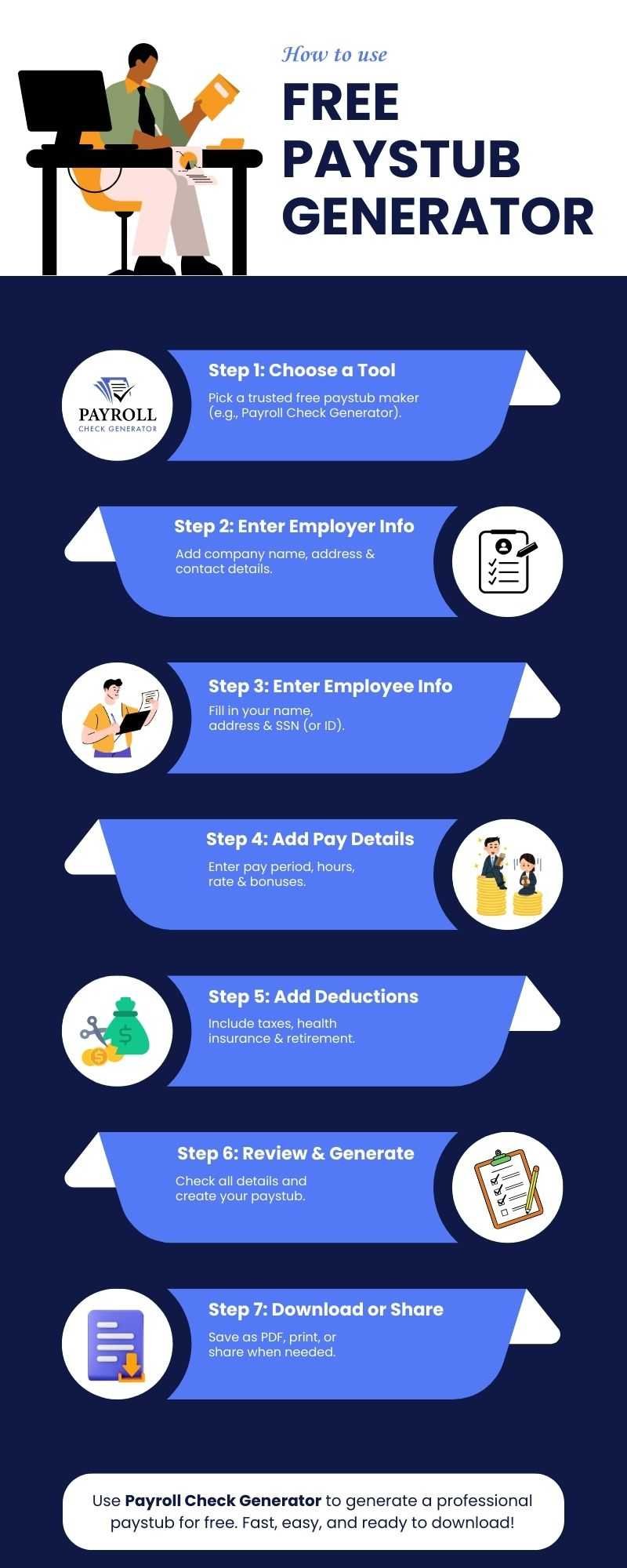
How To Use The Free Paystub Generator Tool? 

How to Use a Free Paystub Generator

A pay stub generator is an easy-to-use tool and only takes a few minutes to generate the 1st pay stub free. Follow these steps:

Step 1: Choose a Free Paystub Maker 

There are a number of free online websites that will let you make free pay stubs. You can choose the best one- Payroll Check Generator to generate the paystub and get 1st paystub totally free. 

Step 2: Enter Employer Information 

Add a company name, address, and contact information.

Step 3: Enter Information on Employee’s Field 

 Put in your name, address, and social security number or other information.

Step 4: Add Pay Information

 Enter your payroll period, hours worked, pay rate, and any bonuses.

Step 5: Add Deductions

Look at your federal, state, and other deductions, such as health insurance and retirement contributions.

Step 6: Review & Create 

Verify all information is correct and create the PDF or print your paystub.

Step 7: Download or Share 

Save the paystub to your device or share it with your employer, bank, or any agency.

By following the steps, you can create and download the paystub. Most of the paystub generators are user-friendly, thus don’t require an accounting experience or payroll expertise. 

Benefits Of Using A Paystub Generator 

A paystub generator has numerous benefits for employees and employers. Here are the key benefits:

  • Precision and Error Reduction 

Payroll errors may result in legal problems or disgruntled employees. A paystub generator delivers precision calculation for gross pay, deductions, and net pay every time.

  • Time Savings

It can take a long time to manually make pay stubs. A paystub creator does the math for you, so you can keep track of everything while generating a paystub in minutes.

  • Professional Look

The generated paystub looks official & professional, which can be shared with banks/landlords, or representatives and organizations that ask for you to provide proof of income.

  • Simple Record Keeping

Free pay stub generators offer the feature of downloading and mailing digital pay stubs that can help to maintain organized financial records all the time.

  • Legal Compliance 

The paystub generator tool is great for ensuring you comply with the tax and deduction regulations set by the law at the state and federal levels. 

  • Easy for Freelancers and Contractors 

Freelance and contract workers can easily generate pay stubs to provide income verification to clients, lenders, or state and federal tax agencies.

In general, a paystub generator makes it easier to manage your payroll and also guarantees professionalism and convenience.

Key Takeaways 

A paystub generator is a great tool for employees, freelancers, self-employed persons, and business owners. 

The paystub generator ensures accurate records, simplifies tax filing, and provides official proof of income whenever needed. Using a payroll check generator saves time and reduces errors, making payroll management straightforward. 

Start generating your pay stubs today to keep your financial records organized and reliable.

FAQs: 

1. How to generate a pay stub for free?

The pay stub generators allow you to create a first pay stub for free. Just input your income, deductions, and tax, and the program will generate a professional pay stub in a click that you can download or print.

2. What is the easiest way to get pay stubs?

The easiest way is to use an online pay stub generator or a pay stub app. These tools need very little information from users, calculate deductions, and offer to download the generated pay stub file in a few seconds.

3. Are there digital pay stubs?

A lot of paystub generators offer electronic versions of pay stubs; you can view or download them and even email them, rather than having to keep physical copies.

4. How to make a paystub free? 

To generate the pay stub, you can use an online free pay stub generator. Enter your employee or self-employment information, income, and deductions. Usually, you can create and download a pay stub for free using most tools

5. Can I use Paystub Generator for self-employment paystub creation?

Yes, self-employed individuals can use pay stub generators. Enter the information about your income, tax withholdings, and any deductions to generate professional-quality pay stubs for personal recordkeeping or to forward to lenders or finance companies.

Need a Paystub Right Now?

Save time and create professional check stubs online with just a few clicks.

Create Free Paystub

Independent Contractor Pay Stub: How Can You Create a Stub in a Minute?

Independent contractors are paid hourly. But do independent contractor pay stubs actually get delivered to them? This guide is all about independent contractors and their pay stubs where you will get to know everything you need to know about them leaving no stone unturned.

What is an Independent Contractor?

An independent contractor is a sole entity hired to provide service to a client’s business without being a regular employee. An independent contractor pay stub is a document that summarizes an employee’s wages, information on taxes and other compensation for a particular pay period.

An independent contractor pay stub helps employees in monitoring their payment history and it also simplifies payroll calculations and reporting it to the government authorities.

Tracking Hours as an Independent Contractor

An independent contractor pay stubs helps employers in maintaining transparency around tax calculations and wages. The pay stub goes along with the employee’s paycheck.

With an independent contractor, pay stubs also record the working hours, providing employers with an insight into the hours worked and the payment due.

Independent contractors do not receive a typical paycheck from their employer, but it is a common practice for contractors to submit a pay stub independent contractor and invoice for their services.

Contractors can get a hold of an independent contractor pay stub for your services. It helps you in organizing and monitoring your expenses, making things easier for you when it comes to filing taxes.

What is a 1099 employee?:

A 1099 employee is defined as an independent contractor who receives a 1099 Form from an employer. Unlike a salaried employee, a 1099 employee who pays their own taxes and does not receive benefits. Unlike regular contractors, 1099 employees are self-employed and pay their own taxes.

Need a Simple & Accurate Way to Create Paystubs?

Our Free Paystub Generator Has You Covered!

Payroll Check Generator is the easiest solution for small businesses, contractors, and freelancers. Instantly generate professional paystubs with accurate tax deductions,
Year-to-Date (YTD) values, and all compliance-ready details.

Try Free Paystub Generator Now


What constitutes an independent contractor?

When you generate an independent contractor pay stub which includes the elements that makes your pay stub complete, keep a check on the following things:

  • Client Information: It will include your client’s name and address at the beginning of the pay stub, mostly on the top left.
  • Personal Information: Insert your personal information, including your full legal name, address, social security number, pay period and pay date.
  • Gross Earnings: This is what you earn before tax deductions are made.
  • Pay Rate: Fill the hours you have worked during the pay period and the hourly rate.
  • Current Total: Multiply the working hours with the rate gives you the current total.
  • Deductions: This includes various taxes that you have to pay. It includes multiple local, federal and state tax payments.
  • Net Pay: This is the final amount that you take home.

Step-by-Step Guide on Creating an Independent Contractor Pay Stub

Generating independent contractor pay stubs is an easy and hassle-free process if you know the perfect steps. Below is a step-by-step guide on creating independent contractor pay stubs:

  • Choose a template: Choose from various independent contractor pay stub template for your business needs.
  • Insert company name: Fill the paystub by inserting your company’s name, address and employer identification number.
  • Insert contractor information: Insert the contractor information which includes the contractor’s full name, address and social security number.
  • Insert earnings information: After inserting client and customer information, insert the pay period, pay date and payment schedule.
  • Insert income and deduction information: Fill the gap in your gross income, rate, hours worked and the current total. Proceed towards deductions to current and year-to-date values.
  • Preview: Preview the whole independent contractor paycheck before you download it.
  • Download: Hit the download button & the independent contractor check stub will be downloaded for you in PDF format.

What is a 1099 independent contractor?

A 1099 independent contractor is an individual who provides services to another individual under a contract, rather than being an employee. A 1099 independent contractor is solely responsible for their own business, working with clients under agreed terms.

Difference between an Independent Contractor & Employee?

Criteria Independent Contractor Employee
Relationship Short-term Full-time
Employment status Individual method of working Employer directs when and how to work
Source of income Depending on the project Fixed salary
Taxes Independent tax payment Taxes deducted at source
Benefits No entitlement to any benefits Qualified for a health insurance
IRS forms Form W-2, W-4 Form 1099-NEC, W-9

Independent Contractor Pay Stub: Benefits

The following are the benefits of independent contractor pay stubs:

  • Financial Transparency: Pay stub documents clearly aids both contractors and clients in monitoring earnings and solving disputes.
  • Tax Management: Pay stub simplifies tax preparation by keeping an accurate record of gross earnings and tax deductions. 
  • Proof of Income: Independent contractor pay stubs serve as income documentation, which is needed for loans or rental agreements.
  • Resolution of Disputes: Detailed records help in resolving disputes by providing verified proof of income.

Building Blocks of Accurate Independent Contractor Pay Stubs

  • Accuracy and Transparency: Make sure all the details is correct and avoids any misunderstandings, and smoothens tax preparation.
  • Compliance: Required information supports the legal framework and helps in preventing disputes with tax authorities.
  • Formatting: Uniform pay stub formats across platforms, which enhances readability and record management.

Visit payroll check generator now to experience the power of a free independent contractor pay stub template & generate one for yourself.

Ready to Generate Pay Stubs Instantly?

Create professional pay stubs in less than 2 minutes. Get started now with our
Free Paystub Generator and choose from a variety of templates to fit your needs.

Get First Paystub for Free

Pay $5.99  $3.99 from the second paystub!!

Generate Paystub Now

FAQs

1- Can I create an independent contractor check stub for myself?

Yes, you can create an independent contractor pay stub for yourself by entering all the required information and then downloading the stub in PDF format.

2- How long does it take to create a pay stub online?

With tools like the independent contractor pay stub generator, it just takes 2 minutes to create a stub online.

3- Is the independent contractor 1099 pay stub template free to use?

Yes, the independent contractor 1099 pay stub template is free to use and you can simply generate professional pay stubs for yourself.

Key Takeaways

Creating independent contractor pay stubs is fast. You can use online pay stub generators to create professional pay stubs in under a minute. Just enter your personal information, choose a template, and download your stub right away. 

This efficient process helps independent contractors keep clear and organized records for income verification and tax purposes. Accurate independent contractor pay stubs save time, cut down on errors, and help with financial management.

How to explain payroll check stubs to employees?

50% of US employees are struggling to make ends meet due to rising costs and payday. While payroll processes have been modernized over the years, the employees’ understanding about payroll check stubs hasn’t kept its pace.

HR professionals are the go-to resource for payroll check stubs confusion, right from tax questions to deductions that employees do not get elected for.

This guide provides an in depth explanation about how employers can easily explain payroll check stubs to employees.

Create Professional Payroll Check Stubs Instantly

Save time and reduce payroll errors with our Free Payroll Check Generator.

Generate My Free Paystub

What are Payroll Check Stubs?

Payroll check stubs are documents that are issued by the employer that break down the employee’s gross pay, deductions from those earnings, and net pay. For employees, it provides a record of their earnings, which helps them in understanding their taxes and deductions which allows them to ensure that they are getting paid in a timely manner.

Why are Payroll Check Stubs Crucial?

Payroll check stubs are vital for employees for the following reasons:

  • Proof of Income: These are required when applying for loans, credit cards, or mortgages. Lenders use it to verify financial stability and employment status.
  • Transparency: Employees can clearly see how their pay is being calculated, which builds trust. Transparency also reduces misunderstandings.
  • Budgeting: Employees can plan their expenses, savings, and investments which are based on net income rather than gross earnings.
  • Reporting Tax & Compliance: Generated a pay stub using the payroll check generator can be used by employees to file accurate tax returns and claim refunds.
  • Recordkeeping: Recordkeeping makes it easier to track payments and deductions as well as resolves any payroll discrepancies.

Simplify Payroll for Your Employees

Build trust by giving employees clear, accurate, and professional payroll check stubs.

Try Free Payroll Check Generator

Key Sections of a Payroll Check Stub

By breaking down each section clearly and consistently, you will be able to build trust and transparency into each payday. Let’s see the main sections of payroll check stubs:

  • Employee Information: Basic information such as name, address, employee ID, or job position.
  • Pay Period: Starting and ending dates for the earnings covered by the paycheck stub.
  • Gross Pay: Total amount earned before deductions are made. 
  • YTD Totals: This shows the whole amount paid and is deducted over the calendar year. 
  • Net Pay: This is the actual amount that a person takes home.

How Employers Can Explain Payroll Check Stubs Clearly to Employees?

Some of the employees feel embarrassed when they do not understand why their paycheck is shorter than they expected. Understanding payroll check stubs is one of the confusing aspects of pay stub literacy.

Employee deductions fall into three categories: mandatory deductions, voluntary deductions, and involuntary deductions. Some deductions include taxable income, while others are taken as post-tax.

In some cases, employees might notice that their deductions vary from paycheck to paycheck. With this level of complexity, it is important for employers to explain deductions with clarity and empathy. Many employees do not understand the whole scope of payroll check stubs and what’s being withheld from their earnings, which can lead to mistrust.

You can visit our website here for more information.

Also Read: Benefits of Using a Free Payroll Check Generator for Your Business

Simplifying Paychecks for Everyone

Payroll check stubs may look like a small thing in the big plan of HR tasks, but it’s a strong push for employees’ happiness. When employees get their pay stubs, they feel less stress and trust HR more. Being clear about pay also stops disputes and makes a lively environment all around.

It’s key to note when you talk about this. Not all know how to read a pay stub or create a pay stub using a payroll check generator, and for some, it’s their first time seeing one. Employees provide tips about check stubs by using a payroll check generator and build trust towards employees.

Give Your Employees Confidence

Show professionalism and accuracy with a Free Paycheck Stub Generator.

Start Generating Paystubs

FAQs

1-  What is the most important information on a paystub?

There are three major parts in your paycheck: the earnings that you are going to receive, the taxes that are going to be taken, and any other deductions. Keep a close eye on your earnings from the start of the year, gross and net pay.

2- Why is it important for you to understand your information on a paystub?

One of the key components of managing your personal finances is knowing what amounts make up your paycheck and the destination of your money. The money you are said to earn when you get a job is your gross pay, whereas the amount that you actually receive, or net pay, is what is available for spending and savings.

3- Why do we need pay stubs?

Payroll check stubs are used by employers and employees to check if the correct amount of compensation has been made. Besides that, a part of the bank procedure lenders usually want to look at pay stubs as proof of income or employment before giving a green light to a loan.

4- What is the meaning of payroll check stubs?

A payroll check stubs is defined as a document that an employer gives that specifically shows the employees’ earnings, deductions, and net pay for a certain pay period. It is the record of the employees’ earnings and assists the employees in comprehending the way their pay is calculated.

5- What does stub mean in accounting?

The time from the date of the transaction or the valuation to the start of the financial year is known as a stub period. Normally, it is a part of a year or a quarter. The stub period comes about due to the fact that valuations can be performed during the entire year and not only at the end of the period.

Key Takeaways

One of the most beneficial ways to create transparency in the workplace is the explanation of payroll check stubs to employees. When employees have a clear picture of what they have earned, what has been deducted from their salary, and what benefits they are entitled to, they will become more trusting and valued.

Top 7 Employee Retention Strategies to Keep Your Best Talent 

Employees are the main link; when you lose them, the costs are high. How accurately you can retain your employees has a ripple effect on your culture, employee engagement and all of your employees. According to the United States Bureau of Labor Statistics, there was little change in the number of job openings at 7.4 million in June. In this case, you need to apply employee retention strategies in your organization.

If you have a formal idea to improve and retain employees, now is the time to take one step forward. Companies need to keep top employees to succeed in today’s AI-generated era. 

Many things make an employee stay long or leave soon. Don’t let pay issues be a big reason why someone leaves. Use our free payroll check generator platform, and you can make sure pay problems won’t cause employees to leave.

Also Read: Benefits of Using a Free Payroll Check Generator

This blog focuses on a foolproof approach on how you can retain your top employees by using the most effective strategy.

What is Employee Retention?

Employee retention is the step to encourage employees who have been working for a company to keep working in the same company. Retention can minimize the turnover, keep employees engaged and help the workplace run more efficiently. 

Why is it Vital to have an Employee Retention Strategy?

Employee retention plays an extremely important role in your company’s growth. In recent years, employee retention and turnover has topped the list of workforce management hurdles which is cited by HR. Below we have mentioned some costs and reasons for employee turnover.

Costs of Employee Turnover

How much does it cost your company when you lose an employee? The financial toll includes hiring costs, such as loss of productivity resulting from vacant positions.

On average, it costs about $4,129 to hire someone. Also, when someone leaves, it usually takes 42 days to fill the job. Plus, replacing someone who quits often costs about 21% of what they make in a year.

When you get a new employee, you must think about the money for their training and the time it takes for them to get good at the job. The cost to swap out a worker is high, but it can also affect the mood of your other workers.

Building Core Team

Teams must get to know each other. Each employee also needs time to learn how to handle new job needs. Keeping employees helps the company in a straightforward direction while making sure the staff have the skills to do good, steady work. Top teams with employees who are easy with each other can boost spirit and cut the chance of people leaving.

Why Do Employees Leave?

Some of the significant factors that are highlighted as the primary reasons for an employee leaving a firm are:

  • Lack of development opportunities
  • Supervision qualities
  • Job stress
  • Colleague stress
  • Unfair compensation
  • Lack of work appreciation
  • Supply of challenging tasks
  • Lack of promotional chances
  • Toxic environment
  • Almost no work-life balance
  • Lack of communication

This list may be long for employers and HR. Even so, there are lots of things to fix, but here’s a bright side: most of these things can be managed by you, and a solid plan to keep employees will help a lot.

By using a payroll check generator, you can easily generate pay stubs for your employees in a matter of minutes without any hassle.

Top 7 Employee Retention Strategies to Keep Your Employees Under One Roof

To retain your best employees in the firm, you can consider the following retention strategies:

1) Career Growth Opportunities

To retain your team members, look for an opportunity to help them develop their careers. This includes providing supplemental training to strengthen their employees’ skills and experience needed to become senior leaders someday, and even paying for additional education.

2) Employee Recognition

Acknowledging a well done job goes a long way. Employees tend to get more engaged when firms notice and recognize employees’ hard work and they will quit if they do not feel appreciated. 

Make sure to shine a light on the top work throughout the firm. Think about award shows set up for big goals or key firm rules, sending thank you notes—both just to one and to all—to mark great work, and give out things like more days off or gift cards. Bosses should also find time to thank their top team folks during work reviews and group meets.

3) Competitive Benefits and Compensation

To keep and thank your team, give them good pay. Check that total pay matches what others pay for the same work, give out extra cash or higher pay for great work, and be clear on how you set pay.

4) Work-Life Balance

Employees have a healthier work relationship and better job satisfaction when there is a thin line between professional and personal lives. If the workload consumes nights and weekends, the employees might leave that role and choose a firm with a better work environment.

It helps when bosses lead by showing and not asking for work time outside of work hours. Bosses should check in with their team now and then to see how much work each one has and change plans if needed.

5) Positive Work Culture

Workplaces that keep employees happy have their style but often have some things in common: they cheer when team members do well, offer help and guidance, ensure time for life outside work, and tie daily tasks to a big goal that feels important to employees.

Also, remember, employees from varied backgrounds often feel better and more involved in a work culture that cares about diversity and making everyone feel included.

6) Equal Workload Distribution

Workers should not just feel ready to handle their work, but also that bosses split tasks fairly among groups. You don’t want a good worker to quit when they see a coworker in the same job does less work and earns more. And while you may like to give more tasks to your top workers, if they get too many, they might feel too much stress.

7) Review Employee Feedback

To spot problems early, ask employees to share open thoughts on their work, workload, and how engaged they feel. You can send out surveys to get them to say how they feel about their job parts. Face-to-face talks help too. When people leave, exit talks can give you good tips if you ask why they left.

Key Takeaways:

To effectively retain your best talent, implementing a combination of top employee retention strategies is essential. Key approaches include offering competitive compensation packages, fostering career development opportunities, prioritizing employee wellness, and promoting a supportive company culture with clear communication and recognition. An efficient payroll tool, such as a reliable payroll check generator, plays a crucial role in ensuring timely and accurate payments, reinforcing trust and financial security among employees.

How Free Payroll Check Generator Can Help Small Business Owners?

Are you neglecting business practices? It should not be neglected. Payroll generation, verification and paystub creation is one of the important business practices for any kind of business.

Pay stubs are extremely helpful for record keeping, which helps employees and employers monitor paychecks. They serve as gross income breakdowns, displaying the wages an employee earns for a set period and other relevant details.

If an employee feels short-changed, they can check the pay stub to know how much was withheld and for what purpose.

This guide focuses on how a free payroll check generator can help small businesses without any hassle.

What is a Paystub?

Pay stubs are financial statements that help employees and employers track paychecks. They serve as a gross income breakdown, displaying wages that an employee earns for a set period with taxes, deductions, and other relevant information.

An employer should check the pay stub to determine how much was withheld and for what purpose. Moreover, employers attach pay stubs to their employees’ physical paychecks.

Why Do Small Business Owners Need Pay Stubs?

The law does not lay down the provision of pay stubs to employees; it is, however, one of the best practices of payroll accounting. Small businesses need pay stubs to show a receipt of employee payments. It is a way to prove that tax payments and retirement plans are made on time.

How to Make Pay Stubs for Small Businesses?

Creating pay stubs for small businesses and employees has been made a lot easier thanks to a free payroll check generator. Payroll check generator has a step-by-step guide on how to make pay stubs for small businesses:

  • Recommend Employee’s Earnings for the Current Pay Period: Advise the employee’s earnings for the current pay period before any deductions have been made. It helps offer clarity on taxes, deductions, and other details.
  • Add Deductions for taxes withheld: You will need to add deductions from federal to state income taxes and FICA. Employees need to know that their taxes are being paid. 
  • Deduct Health Insurance and Employee-elected Retirement Plan Contributions: Now that you have gotten tax deductions, deduct their health insurance and elected retirement plan contributions.
  • Add Other Deductions: If there are other deductions, such as penalties, add them and stipulate what the deductions are.
  • Calculate Net Pay: You can calculate and write down the amount that an employee is going to take home.

How to Make Pay Stubs for Employees?

Use the following details to make pay stubs using the free payroll check generator for employees:

  • Insert the Company Information: Insert the company name, email ID, address, phone number, and location.
  • Insert Employee Information: Insert your name, email ID, and employee ID.
  • Insert Income Details: Insert your income information.
  • Insert Deductions and Other Details: Insert other details that will help stub generation.

How to Choose a Free Payroll Check Generator for Your Business?

A free payroll check generator merges all the payroll data and invoices that you insert to generate pay stubs. There is no need to hire an accountant to see the generation as 1st stub is free. If you’re looking for a pay stub, keep the following points in mind:

  • User-Friendly Interface: The platform is user-friendly. It will seamlessly help you navigate the website and the stub generation process.
  • Export with PDF: Our website offers export with PDF, which means when you download your pay stub, it will automatically be downloaded in PDF format.
  • Free to Use: Our platform provides free-to-use availability. In case you’re moving on a tight budget, your money can be saved by using our Free Payroll Check Generator.

Should You Make Your Pay Stubs?

Yes, you can create your pay stubs. If design is not your concern and need full control over the pay stub, you can use softwares such as Microsoft Excel. There are various generators online but our Free Payroll Check Generator lets you create your pay stub in a minute.

Who can use the Free Payroll Check Generator?

Employees, employers, and freelancers can use the free payroll check generator. The best thing about the free payroll check generator is that it is more easily accessible and is easy to use. 

Small business owners can use it to maximize their resources and cut down on labor costs while preparing employee pay stubs and managing payroll.

In this same manner, business owners who have humongous employees can take the most advantage of the free payroll check generator to ensure they prepare payslips for all employees and meet the deadline for each pay period. Pay stub generators enable employees to provide proof of income while applying for a loan.

FAQs

1- Is the free payroll check generator legit?

Yes, using a free payroll check generator is legit as it showcases wages and complies with the laws. However, generating fake pay stubs is illegal. Ensure that your pay stubs are in line with the law and seek legal advice if needed.

2- How do you check if a pay stub is valid?

You can authenticate the check stub: (a) call the issuing bank to verify the account, (b) call the issuer to verify that the checks are real.

3- How long is a check date valid?

Personal and payroll checks are suitable for 6 months. Some businesses have voided checks after 90 days pre-printed on their checks.

4- How long do you have to cash a payroll check?

Personal checks, company-printed checks, such as checks issued by a business for payroll or other purposes, and six-month U.S. treasury checks are paper checks issued by federal government agencies.

Key Takeaways

Now that you have all the knowledge about the free payroll check generator, you can easily generate pay stubs by using our website and not getting confused about which generator to choose for your business.

Top Benefits of Using a Free Payroll Check Generator for Your Business

Payroll management is the core of your business; this makes sure employees are compensated correctly and on time. Small business owners and startups navigating the lanes of payroll can feel overwhelmed, especially with limited resources and budget restrictions.

Leveraging a free payroll check generator is a transformational process that gives you peace of mind in your payroll process without you spending even a single penny. In this blog, we will be taking a wide look at the top benefits of using a free payroll check generator for your business.

What is a Free Payroll Check Generator?

A Free payroll check generator is a tool that helps businesses generate pay stubs easily. Employers can just add the relevant ingredients of an employee’s information into the empty fields and generate a stub for the employee.

A pay stub is a legal document that is produced by a firm to establish how much money an employee has made during a pay period. Employee check stubs can be issued in printed format, so that you get your pay stub immediately in PDF format.

Who can use the Free Payroll Check Generator?

The following entities can use the payroll check generator:

  • Small Business Owners: Owners who need to create pay stubs for their employees without investing in costly pay stub software.
  • Employers with Salaried or Part-time Staff: These tools accommodate several employment types and payment structures.
  • Independent Contractors: They require official documentation of their income for record-keeping purposes.

Top Benefits of Using a Free Payroll Check Generator for Your Business

The following are the benefits of using a free payroll check generator for your business:

Cost-Effective Solutions:

Traditional payroll tools can involve hidden costs or ongoing subscription fees. A free payroll check generator cuts down these expenses fully. By using this tool, which delivers vigorous functionality without a price tag, you can redirect the financial resources towards vital growth initiatives, such as launching a new product or hiring a new employee.

Instant Access and Ease of Use:

Accessibility is the strongest pillar of a business tool. A free payroll check generator is available online with just a few clicks, no waiting in a long queue, or any kind of learning curve. You can immediately access the generator from anywhere, at any time, making payroll processing convenient and flexible. Whether you need an online generator for one-time processing or for continuous use, the simplicity of this tool means anyone can handle payroll.

Time-Saving:

Manual payroll calculations are prone to errors. With the help of a free payroll check generator, routine calculations, from gross wages and tax withholdings to net pay, can be automated quickly. The built-in calculator and wide range of templates eliminate the repeated elements. With this tool at your fingertips, you can save valuable time and encourage your team to focus on the core tasks.

Accuracy and Compliance:

Mistakes can be costly- errors in tax deductions or overtime calculations can lead to legal trouble. Tools like a free payroll check generator can reduce these errors. Equipped with up-to-date regulations and automated compliance checks, these tools can help ensure that the calculation matches the federal, state, and local laws.

Professional Documentation:

Payroll check generators can generate professional, easy-to-read check stubs. These documents provide a clear breakdown of your earnings, taxes, and deductions, giving employees transparency and peace of mind. Moreover, most trustworthy generators offer data protection and privacy features to keep sensitive information secure.

Flexibility:

Businesses operate in a fluid environment, with gig workers and freelancers joining the party. A free payroll check generator delivers the flexibility required to handle diverse payroll scenarios- from salaried employees to hourly workers or remote contractors. You can easily adjust parameters, commission, and process checks for varying pay cycles.

Employee Satisfaction:

Delivering timely paychecks is non-negotiable when it comes to employee morale. Using a reliable payroll check generator makes sure that each team member receives their full wages every time. A professional printed check stub elevates your business standing, instilling confidence in both your workforce and external partners.

Paperless Option:

In today’s time, most of the free payroll check generators offer digital pay stub delivery, allowing employees to access pay information via email. This not only cuts out printing costs but also supports your firm’s goals.

FAQS

1- Is it safe to use a payroll check generator?

Yes, it is safe to use a payroll check generator. Some services offer a full payroll check generator, while others might have limited free options that are required after a trial period. 

2- Is a payroll check legal?

Yes, a free payroll check generator is used for legitimate purposes, and using such tools is legal. However, falsifying payroll information is illegal.

3- How can I access my generated pay stubs?

After you have filled out the important information, most of the information will let you download or print your pay stub in PDF format.

4- Is there a limit on the number of pay stubs I can generate?

Most of the free tools allow unlimited use, but some may restrict free downloads or offer paid opportunities for advanced features.

Key Takeaways

Whether you’re a small business owner, freelancer, or managing a diverse workforce, a free payroll check generator simplifies one of the most crucial administrative tasks. Enjoy secure, professional documentation, flexible payment options, as your company evolves—all while supporting sustainability through digital processes.

Download Our App
Now to Generate Paystub
Instantly!

© 2025 PAYROLLCHECKGENERATOR.COM | ALL RIGHTS RESERVED